
This is one of my biggest drawbacks, I get so easily distracted. There are some people who claim this is a downfall of a creative or imaginative mind – I beg to disagree. It is in fact an affliction. I’ve been afflicted with this for quite some time. It’s not so much new and shiny things that attract my eye, it’s more “oooh, that’s cool, how’d they do that” things.
For instance, I have been twitching to make a variety of small scenes. Nothing spectacular, just something that can be used in small to medium renders. One of the things I want to do, is quick to render, quick to place buildings. Now, there’s a good few things out there already. Faveral’s Medieval sets for instance. Stonemason has a wide variety of SF scenic items and interior models. Just to name two of the many. Basically though, I’m a pretty lazy person. Don’t get me wrong, I don’t mind making the effort for something but if it’s tedious, I will probably lose interest and move on to something else. So, imagine my excitement when I saw an advert for a tutorial on a procedural builder. Okay, this is not new news, procedurals have been around for quite some time and a lot of creators already use them for a variety of purposes. But, I’ve never really known how to do this in my modeller of choice, Modo. I don’t mean procedural textures, I kind of get that, but procedural modelling. Now to me, this is akin to rocket science.
I had no clue how to even start such a thing, and no clue how it would work. At which point I stumbled across this a short while back “Procedural Building Modelling in Modo” by Sergey Tyapkin, or rather – How to create Procedural Building Generator in Modo. It’s not just a cool toy to play with, the gentleman actually goes into some detail on how he created it, what to do, and how to do it. >insert invective of choice< cool!!! For those who want to grab this, it’s available on Gumroad and contains the generator, tutorial and building models.
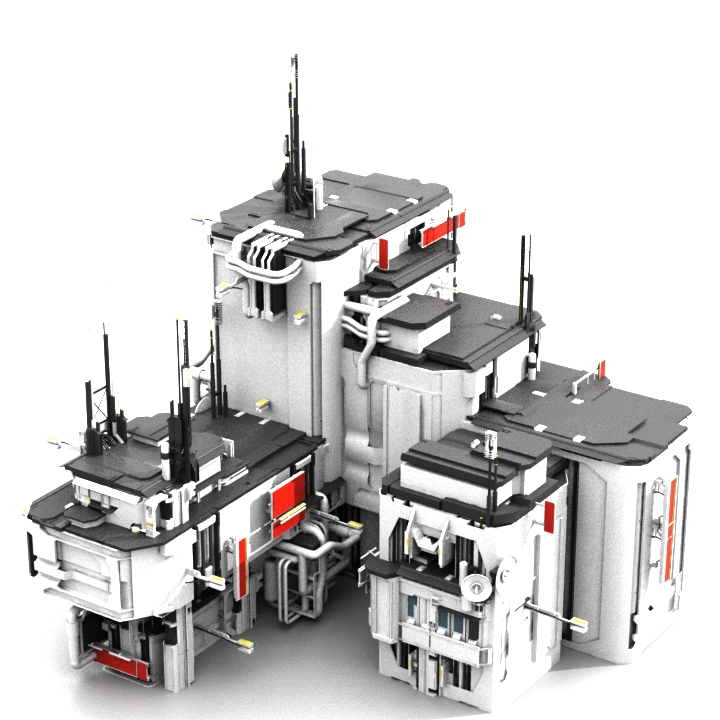
So, logically, following his instructions and examples it should be possible to create something of my own and have my own models etc assembled randomly into interesting buildings. Like the image above – this is a small sample of what is included with the tutorial. The larger proportion of which is assembled from a library of models. Fascinating stuff. And this is one of the things I have become distracted by. Playing with it, as much as trying to learn how it works. Of course, this does not contribute towards my primary goal of replacing the Daz archive models I promised. **cough** Erm, I will get it done. Honest.
Anyway, just a thought for any other Modo users out there who haven’t heard of this tutorial yet and are similarly fascinated by cool toys – as I am.
Of course, in addition to this I’ve been digging around in the surfaces section of Modo, trying to learn as much as I can about that, seeing as it’s my primary development platform. The logic being, that once I get a good handle on what I’m doing there, I can start texturing models directly in Modo, bake the texture to a UVMap, and just dump the model here. Yes, I have Substance Designer which is damn good at that sort of thing, but for quick and easy models I don’t want to start switching between applications if I can avoid it. Best way to move forward with that, is to learn how the one I’m using works. At least, that’s the excuse I’m using.
This will be followed by digging around in the shader tab and seeing what I can do there. So much to learn, so little time to do it in. I’m seriously beginning to doubt that I have enough life left to get half done that I want, let alone actually getting good at anything. For the last couple of months, I’ve felt like a kid left unguarded in a giant candy store. Must learn restraint.
Take care, have fun. I am.
