If you are not having fun, do something else.

As you may have guessed from my previous post, I’m stuck against a wall at the moment trying to decide on how much to add to models. So, as it was my birthday yesterday I thought I’d take some time out to just have a bit of fun. You know, I’ve said for years that if what you are doing isn’t fun anymore do something that is. Well, for once I practiced what I’ve been preaching. So, fired up the X-Box-X and orf into lala land for a while. Two days playing Wildlands with my daughter interspersed with a little blat in Borderlands 3, some chaotic zombie fun in World War Z and a quick gander at the new Ghost Recon game, Breakpoint. Just some mindless blatting and running around to find things to kill – well, except in WWZ where the things come and find you. And, a little bit of wandering around in Far Cry 5.

I really should step back and play a game or two more often, I have a nasty habit of digging and picking at a problem or a project until I’m sick to death of looking at it. Really don’t recommend doing that as it never ends well. Over the years I think I’ve abandoned more projects than I’ve completed. Sometimes it’s because I can’t take it further due to a lack of ability and sometimes it’s because I’ve just gotten so damn tired of it. I don’t recall how many years I’ve been telling other people to just walk away when the fun stops and find something entertaining to re-charge the batteries, but I have very rarely done it myself. Hypocrite much? No longer, nope, not any more. Now, I’m going to just walk away from things that irritate me and go do something that is way more entertaining. Come back once I’ve cleared my mind and either have some new ideas on the theme, or at least have figured out what I want to do with it. I guess that does mean things will take longer, but hey, I might actually finish stuff for a change.

I’ll let you all know when I actually finish something, see if it works. Meanwhile, off to have some more fun.

Posted in Babbling | Comments Off on If you are not having fun, do something else.

Drawing Lines

One thing that I’m finding a bit of a challenge at the moment is deciding when and where to draw the line and say “done” with the models I’m updating. I’m extremely impressed with the way Substance Painter deals with detailing, and a fair amount of detailing could be dealt with using this software. Screws, bolts etc can all be added via alphas and then baked into the texture as a bump or normal map. But… and this is where I’m having the issue. Sometimes, it’s just nice to actually have that detailing in the mesh. For instance, a couple of the rifles I’m working on have an indented sling bar in the stock. There is an alpha for Substance that looks the part, but, it won’t really be there. I’m unsure at the moment how that would affect things if I was to add a sling. I suspect, that until the model is rendered it would look like the ring is embedded in the stock only displaying correctly when rendered. This makes me a little uncomfortable. First because it makes posing the sling difficult as you have almost no effective visual reference to work with, and, I don’t know, perhaps I’m just being silly about it, but it looks wrong somehow, and doesn’t feel right.

That’s just one example, there are others. There is so much available for substance, and so much of it is beautifully created and works a treat, but it almost feels like cheating. Using alphas to create detailing leaves the end user with the difficult task of making sure that everything is lined up properly for their render. Whether this be hands, fingers or other items, or even – as in the case of the sling – props are aligned correctly. This could result in multiple test renders to check, when if I modelled the detailing, it would be easier and no messing around with test renders to check alignment.

Obviously though, modelling this detailing would result in a higher polycount. A weight that would grow with each extra piece modelled in.

So, there’s the problem. Physical or virtual detailing, fewer or more polys. Computers, graphic cards and software are all more powerful now than it used to be, so high polycount is less of a burden than previously. However, when setting up a scene, it can get pretty heavy once items are added. Okay, yes, we do have the facility for multiple renders with alphas set up and then the image compiled in Photoshop, Gimp or whatever. Still, this doesn’t help with deciding where to stop adding details.

Ahh, 1st world issues huh? The rest of the planet should be so lucky as to have to wrestle with the problem of “more poly or not”… Oh well, I’ll figure it out eventually I suppose. Just felt like wasting a few minutes of my time whinging about it here.

Take care, have fun.

Posted in Babbling | Comments Off on Drawing Lines

Akira Yamaha

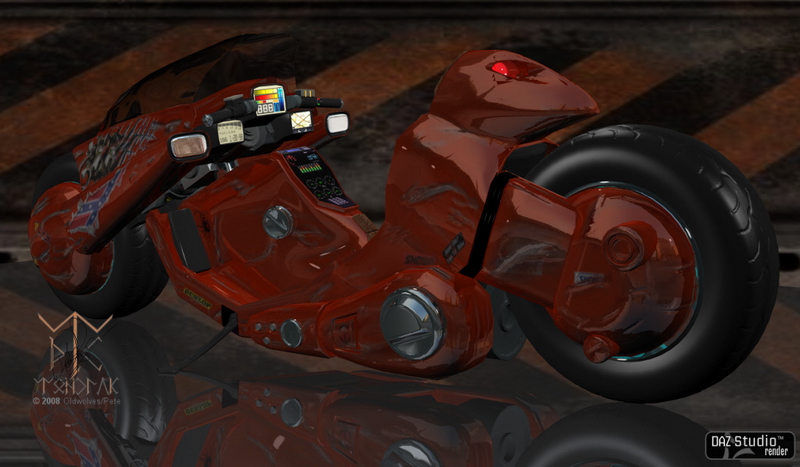
Many moons ago while I was hanging around on the old Team Dystopia site, one of the residents asked me to make a model for them. It’s not a great model, but it’s also not too bad and was created around the time I was learning to make models better – meaning that it’s mostly quads, and not a frighteningly heavy polycount. It seems that Team Dystopia has disbanded since then, at least I can’t find them, so I’m assuming they have closed. This being the case, and the fact that I stumbled across the model again. I was curious to see if there was any interest in it. For fairly obvious reasons I can’t release the thing with the textures that are applied to the model, but I think it should be okay to release just the model, allowing people who want the thing to apply their own textures to it. For again, obvious reasons I can’t give commercial permission for this toy as it is owned by a Japanese company and not my IP at all. The model however is, as I made it based on the design of the motorcycle ridden by Kaneda in the Akira movie.

So, if there is some interest, I’ll get it cleaned up and packaged for download. The following image is one of the renders I made with this model, it’s relatively simple but I think shows it off quite nicely.

Anyway, I’ll see what the response is and make a decision then.

Kaneda’s motorcycle from Akira.
Posted in Models | Comments Off on Akira Yamaha

Shaderballs? Renderballs?

So, these things that you see all over the place in most software showing off whatever texture it’s supposed to represent. A few years ago, there just weren’t any available unless you were lucky. Nowadays, the things are everywhere. The ones I use, and yes I do use more than one, are available free on Artstation and Gumroad. Just pop over to the site and in the search bar type in Shader ball, and you’ll get a selection – most of which are free, although you will have to sign up for an account in order to download.

Now, these things are available for different software so you might need to smile sweetly at somebody you know who has the software for the Shaderball you want to use, see if they will export an FBX or OBJ of the thing. Once you have that, you might want to name the various pieces so you can apply textures or shaders to different parts, or whatever. Most of them are already UVMapped by the creator (thankfully) although not all the maps are great.

There are some people out there who will insist that using a shader/render ball is the only way to work on textures. Well, okay, yes it is easier and more visually immediate – not to mention faster to render (mostly), but quite frankly until you apply that work onto an object you aren’t going to know how it appears. There are some textures I’ve downloaded that look great on the shaderball but s**t when applied. You win some, lose some, have to tweak everything.

So, these things are useful, yes, but you might want to test your creation on a model before you decide it’s “done” if only to check how much tweaking is needed.

Just to illustrate the wide variety of these models that are out there I’ve uploaded a few images (link at end of post.) Most of these are available either on Gumroad or Artstation, although you can find a few with a web search for Free Shaderball. You don’t have to do what I did and grab all of them it’s not necessary. Unless you’re a compulsive collector *cough* but, you might find that different models fit different purposes and want to grab a couple at least.

The Substance shaderball in the following images (end of gallery) is available from the Allegorithmic website, in their Substance Share section. There’s just the ball, and a shader guy sort of figure, you should be able to figure out how to make just a plain ball with base.

Out of all of these I find I use the Lambert Shaderball most often for a variety of materials, and the RS Shaderball for metals and similar materials. The RS comes with two middle sections, one indented (render) and one smooth. If you’ve looked at the materials I’ve been making/creating/screwing up you will recognise one of the following.

Anyway, just to show you what’s out there and to encourage people to go get some.

Link to the gallery page, just so you can see a small selection of the variety out there.

Render/Shaderballs

Posted in Help | Comments Off on Shaderballs? Renderballs?

Messing around with surfaces

So, I mentioned that I’ve been playing around in Modo with Surfaces and textures. I thought it might be amusing to upload a few images to show the kind of things I’m trying to do. Now, most of these won’t be released to the general public as some contain images I don’t have permission to distribute, and I don’t really see me making a whole series of terrains anyway. Okay, you never know, but it’s unlikely. I will however be using some of these in occasional renders for things that I will be uploading for release.

Anyway, onwards and upwards as they say.

Gallery 1 – Rock Terrains

Gallery 2 – Ice? (ish)

Gallery 3 –

Posted in Surfaces | Comments Off on Messing around with surfaces

Distractions

This is one of my biggest drawbacks, I get so easily distracted. There are some people who claim this is a downfall of a creative or imaginative mind – I beg to disagree. It is in fact an affliction. I’ve been afflicted with this for quite some time. It’s not so much new and shiny things that attract my eye, it’s more “oooh, that’s cool, how’d they do that” things.

For instance, I have been twitching to make a variety of small scenes. Nothing spectacular, just something that can be used in small to medium renders. One of the things I want to do, is quick to render, quick to place buildings. Now, there’s a good few things out there already. Faveral’s Medieval sets for instance. Stonemason has a wide variety of SF scenic items and interior models. Just to name two of the many. Basically though, I’m a pretty lazy person. Don’t get me wrong, I don’t mind making the effort for something but if it’s tedious, I will probably lose interest and move on to something else. So, imagine my excitement when I saw an advert for a tutorial on a procedural builder. Okay, this is not new news, procedurals have been around for quite some time and a lot of creators already use them for a variety of purposes. But, I’ve never really known how to do this in my modeller of choice, Modo. I don’t mean procedural textures, I kind of get that, but procedural modelling. Now to me, this is akin to rocket science.

I had no clue how to even start such a thing, and no clue how it would work. At which point I stumbled across this a short while back “Procedural Building Modelling in Modo” by Sergey Tyapkin, or rather – How to create Procedural Building Generator in Modo. It’s not just a cool toy to play with, the gentleman actually goes into some detail on how he created it, what to do, and how to do it. >insert invective of choice< cool!!! For those who want to grab this, it’s available on Gumroad and contains the generator, tutorial and building models.

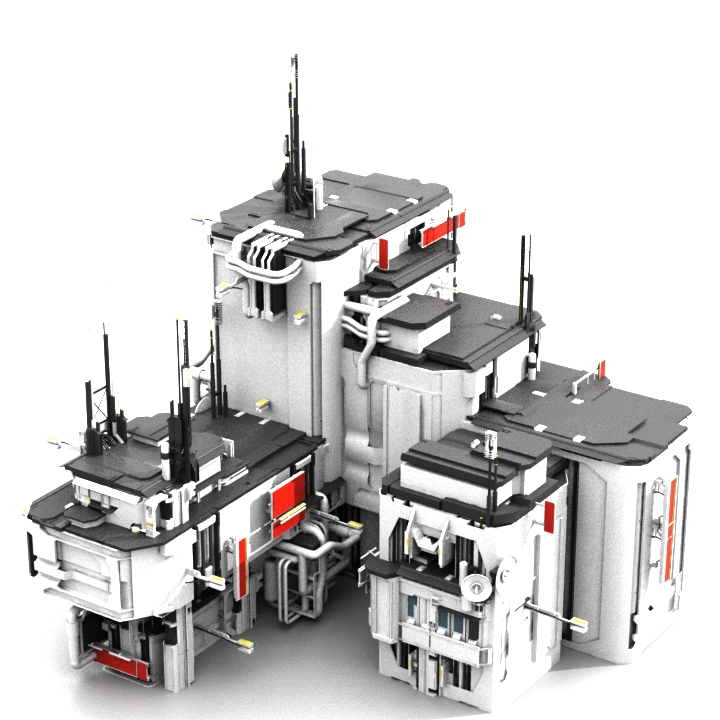
A small example of what the kit does.

So, logically, following his instructions and examples it should be possible to create something of my own and have my own models etc assembled randomly into interesting buildings. Like the image above – this is a small sample of what is included with the tutorial. The larger proportion of which is assembled from a library of models. Fascinating stuff. And this is one of the things I have become distracted by. Playing with it, as much as trying to learn how it works. Of course, this does not contribute towards my primary goal of replacing the Daz archive models I promised. **cough** Erm, I will get it done. Honest.

Anyway, just a thought for any other Modo users out there who haven’t heard of this tutorial yet and are similarly fascinated by cool toys – as I am.

Of course, in addition to this I’ve been digging around in the surfaces section of Modo, trying to learn as much as I can about that, seeing as it’s my primary development platform. The logic being, that once I get a good handle on what I’m doing there, I can start texturing models directly in Modo, bake the texture to a UVMap, and just dump the model here. Yes, I have Substance Designer which is damn good at that sort of thing, but for quick and easy models I don’t want to start switching between applications if I can avoid it. Best way to move forward with that, is to learn how the one I’m using works. At least, that’s the excuse I’m using.

This will be followed by digging around in the shader tab and seeing what I can do there. So much to learn, so little time to do it in. I’m seriously beginning to doubt that I have enough life left to get half done that I want, let alone actually getting good at anything. For the last couple of months, I’ve felt like a kid left unguarded in a giant candy store. Must learn restraint.

Take care, have fun. I am.

Posted in Babbling | Tagged , , | Comments Off on Distractions

To move or not to move?

So, I’m still working on remodelling the files that were in the Daz Archive and I remembered something the first time I made those models. I left them static initially because I didn’t want to compete with the vendors at Daz and to an extent, Renderosity. They were making similar or other weapons that were animated. Moving parts in other words. Rotating cylinder, functioning slide, trigger, hammer etc. Some provided empty shells to simulate ejecting casings and various other functions.

That gave me pause for thought this time round. I am tempted to animate the guns where I can find illustration of moving parts. When I originally built these guns I couldn’t find a decent image of a functioning Winchester anywhere. So I had no idea how the gun cycled, other than the lever action. Ejecting fired cartridges, cocking, none of that was available. Now it is. So, I could make the weapons function (up to a point). But, this again would directly compete with vendors. I always figured that they put in the extra work to make the thing move, so they deserve the credit and financial reward. It was unfair of me to offer free things that directly competed with that.

That opinion hasn’t changed. What has changed is that there are a lot of free models out there which are of commercial quality. Many of them animated. I’ve also noticed that people are ripping models from games, including the animation and sharing these. I have my doubts as to the legality of this, and I won’t comment about things I’ve seen in the “poser” stores which look like direct game rips. The legality issue there is between the company which created it and the person sharing it. Not for me to opine about it.

However, this availability of animated objects gives me pause for thought. With the enormous amount of alternative models out there, would it really harm any individual vendor if I made my models so they could be animated? For instance, a revolver with a rotating cylinder linked to the hammer and trigger for dual action, or linked to the cocking action of the hammer in a single action model. Slides in automatic or semi automatic pistols and such like? Not for every single model I make, but for those that I can be bothered with and that I can find diagrams of to show me the various moving parts.

As an example. The FN-SCAR I made. Would it be so wrong to allow the grenade launcher a break action to load? To have three empty cartridges in the air nearby from a three round burst?

I’m in two minds about firing cycles to be perfectly honest. The firing cycle of firearms is pretty fast. Unless you are specifically filming in slow motion, you just aren’t going to see it as the cycle is usually over in less than two seconds, and faster in most cases. Similarly with muzzle flare, very few rounds produce that explosive flame that most people seem to think should be supplied as normal. That’s a Hollywood thing. Yes, there is muzzle flash, but it isn’t the great sheets of flame and sparks that Hollywood seems to like. Most cordite now is smokeless, so you don’t get huge gouts of smoke belching from guns. In the majority of cases, the only clues a gun has fired is the rather loud report and a shell flying through the air, or the clink clink when it hits a hard surface. You don’t even get that with revolvers, just the bang. There can be and is smoke from a fired weapon, usually not clouds of it, but there is some. There is the cycling action of the weapon. I confess I haven’t seen too many animations from Poserdom (including Daz Studio) showing battles between antagonists wielding firearms. Mostly it’s still renders. More frequently some mostly naked female holding the firearm inappropriately. What is it about scantily clad large breasted females in renders, that they have to have poor gun discipline?

Well, enough of that. It’s something I’m wrestling with at the moment. I just can’t quite make up my mind whether to release static props (no harm in that), or to heck with the vendors (what do they do for me anyway) and animate some of the guns. No, I won’t take suggestions on this, it will have to be my decision in the end. I’m just illustrating one of the things that is causing a delay in making and releasing models.

Posted in Babbling | Comments Off on To move or not to move?

Humans?

Don’t you just love humans? I mean really, they’re so diverse, so unique. Each individual is exactly that, individual. Each person has their own nature and personality influenced by their surroundings and life experiences. Yet, it appears that some can’t accept this. Certain individuals strive to make everyone around them a clone of some mental image of how they presume others should be. Okay, some humans who have a weak willpower or personality and will attempt to conform to this more limited viewpoint. Others will not. What I find fascinating about this, is how those who don’t conform suddenly become the enemy. Creatures who not only have thin skins and cannot stand criticism, but are also somehow reduced in stature to sub-human. No longer a part of the greater humanity, they have mysteriously become creatures who must be derided and insulted and, if possible, removed.

This happens in so many walks of life that it is not easy to settle into a single parameter. Office cliques, school gate cliques, political or social cliques. Religion, race, creed, or whatever. The variation is staggering.

The thing I don’t get though, is how individual people sometimes fall into the same habit. If you aren’t doing it their way, then you must be an arsehole, a moron who can’t follow simple instruction. Regardless of whether you already do or have done something in a way similar to or precisely like that being suggested, you’re still wrong if you don’t immediately do what you’re told and obey! I have seen this sort of thing in a number of different environments, and it doesn’t seem to matter how much people like each other. If you don’t obey the one giving instructions, you are a sub-human waste of skin.

Obedience. Hrrm. I confess I’ve long had a problem with this particular requirement. I don’t do obey very well, and I tend to get sarcastic when somebody tries to force me to do their wishes. No, it doesn’t ever end well, yes I know this. Still, I can’t seem to help myself. When somebody wants me to do something I’ve already done, and they don’t believe me well, that sarcasm just drips out and hey presto the other person gets all offended and starts with the accusations. You know the sort of thing, you don’t want help, you don’t appreciate help, why ask if you don’t want their opinion, you can’t handle criticism/help/other ideas, you’re thin skinned…. blah blah blah, etc etc. This usually followed by snide remarks and insults. Yeah, fine, whatever.

I’ve seen this happen to so many other people and the end result is almost always the same. One person in the conversation gets all angry and nasty, the other person gets all confused and often hurt by the comments hurled at them. The plaintiff “But, I did that already” is often dismissed. Why? Because you didn’t do it their way when they told you. Offices, schools, playgrounds, the local inn, restaurant, burger joint, factory. No matter the locale or people, there is always the same thing occurring.

So, perhaps individuality and uniqueness are not such a good thing after all. Okay, there is a school of thought that it is the very diversity and difference of humanity that makes them so amazing, so wonderful, so resilient, so adaptable. But, is it not this exact same difference/diversity/uniqueness that also brings them to conflict, to wars and hatred? I’ve seen articles that claim it is tribalism that causes problems between different humans. How we all gather into “like” groups – whether that is opinion, belief, religion, politics, or simply race. It’s no great surprise, humans are tribal, just watch football fans for the prime example of that.

We are naturally social animals. We gather for company, comfort, protection and a great many other reasons. However, humans are not naturally monogamous creatures. We wander and roam, see new places, experience other cultures, explore. and we like to meet other people who are not like us. Unfortunately, that can cause problems with the “tribe,” and individuals in our immediate social circle, and you’re back to the earlier paragraph where you don’t obey, or conform, conformity seems to be very important to some of the more strident and theatrical groups, or should that be tribes?

Still, I can’t help looking out in wonder and amazement at humanity. We are a fascinating species. Oh I get frustrated and angry, even to screaming and hair tearing with some of humanity. I frequently look heavenward and wonder where that bloody asteroid is and why it hasn’t hit us yet and if it would kindly hurry up, please. But in between my disgust and anger at humanity, there is a deep fascination with all of it.

Let’s face it, regardless of our bad habits, this world would be so damn boring without people on it.

Posted in Babbling | Comments Off on Humans?

IOR – Index of Refraction.

Many years ago, when first using DazStudio, there was a need for a relatively decent index of refraction – this is the equation that explains the movement of light through an object. A perfect vacuum being 1.0. This index covers any transparent or transluscent object. At some point, somebody decided that the same should apply to metals, which do not allow light to pass through, but rather reflect it. Each metal reflecting to a different degree. Some clever spark determined the algorithm necessary to measure this, and away they went, measuring everything they could.

What this means for us poor schleps down here at the hobbyist level of rendering is that some extremely intelligent people have done all the work for us. I used to share a list, not a complete list, but comprehensive enough for the majority of things found in Daz or other Poser models. I have now found something much better. A very nice person decided to alphabetise and organise a great many materials into a database.

There are two that I have found which are extremely comprehensive, and cover a great many chemicals, materials and substances.

The first is found at the Filmetrics website Refractive Index Database. Just select the letter that leads the material you want to know, and you should find it in the ensuing list. Then click on it’s name which will take you to a page explaining the material and it’s index – please note that some of the database deals with film that the company produces.

The second, and far simpler database is found at the Pixel and Poly website. Index of Refraction Database. This likewise is organised alphabetically and covers a great many materials, a number of which are commonly used for models that are used in Studio and Poser and other rendering systems.

Hopefully this will provide some assistance to people stumbling across my website who are interested in such things.

Posted in Help | Tagged , , | Comments Off on IOR – Index of Refraction.

Fun, Fun, Fun and screaming…

So, my “friend” recommended some software to me. RizomUV for mapping, Substance Painter for well, painting and Substance Designer for funky shaders both from Allegorithmic. In addition to this there are the bridges to take things between these and my modelling app. Fine, okay so far. Then there’s Connector, which allows me to browse and manage the models I have collected and the ones I’m making (bloody useful app actually.) For terrains, she sent me over to another site where I found something quite stunning, Gaea by Quadspinner, I’m still getting to grips with this one, but the algorithms driving the processes are fast and stunning, very fast. Of course, there’s also Marvelous Designer but…. sheesh. When does it stop?

Okay. This is good. Lots of powerful and relatively friendly software that has some serious thought and design in their construction. Of course, learning these things is challenging enough, learning them all together so they can be brought to play on models I intend distributing. Oh my. I used to curse the learning curve years ago, but now it’s a heck of a lot steeper. It is perhaps made easier that the software nowadays seems to be designed for the end user rather than some esoteric and eclectic arty plan of a lone developer high on something expensive. Makes learning much easier. But getting deeper into the programs to make them tick rather than just clicking things for amusement. That’s a tad harder.

I confess and admit that I have been having a lot of fun messing around with all these new toys – even if my bank account is screaming at me to STFN! Not to mention the growly noises my wife is making, especially when I mention that I need to update my modeller. Household budget? Who needs one of those?

In among the fun, there has also been some screaming. Amusingly not frustration at the software, most of which works precisely as expected and is surprisingly stable. I say surprisingly as I’m rather used to having to use software that is somewhat unstable and full of irritating bugs. No, the screaming is in frustration at my aged brain not being able to pick things up quickly enough.

So, my dear friend very kindly made me a cheat sheet for keyboard shortcuts for Rizom. BIG thanks for that. I then went on a google hunt to see if I could find similar things for other software. It’s actually very surprising how many very helpful people out there have constructed lists or graphics of keyboard shortcuts. It’s also surprising how MANY some software have. One useful site I stumbled on is Shortcut World. So, I’m going to link to it in this post because I suspect other people might find something useful there the same as I did. They have shortcuts for Windows, Mac and Linux software.

So, what exactly have I done? Bugger all. I’ve been poking around in software, importing, exporting, clicking on buttons to see what happens, and sometimes screaming because I can feel neurons committing suicide while they rush around trying to store so much new information that I’m becoming convinced my mind is running out of storage space.

Playing around in software is sometimes fun, and sometimes it’s like listening to CL4P-TP speaking.

Posted in Babbling | Comments Off on Fun, Fun, Fun and screaming…